The Ultimate Guide to Netezza to BigQuery Migration: Strategy, Architecture, and Execution
In the world of enterprise data, a seismic shift is underway. For years, Netezza (now part of IBM) was a dominant force in the data warehousing appliance market, renowned for its speed and simplicity in an era of on-premises infrastructure. However, the landscape has fundamentally changed. The rise of the cloud, the explosion of data volumes, and the insatiable demand for real-time analytics and artificial intelligence have exposed the limitations of legacy, appliance-based systems.
Enterprises are now undertaking a critical initiative: Netezza modernization. This journey frequently leads them to a single, powerful destination: Google BigQuery. This is more than just a platform change; it's a strategic move away from a fixed, capital-intensive model toward a flexible, scalable, and intelligent cloud-native future.
This definitive guide provides a deep dive into every facet of a Netezza to BigQuery migration. We will explore the architectural differences, outline clear migration strategies, detail the technical execution, and provide a roadmap for success. Whether you are an enterprise architect, a data leader, or an engineer on the front lines, this article will equip you with the knowledge needed to navigate this complex but transformative process.
1. Introduction: The Inevitable Shift from Legacy to Cloud-Native Analytics
The decision to migrate from a stable platform like Netezza is never taken lightly. It's driven by a confluence of powerful market, technical, and business forces that make the status quo untenable for forward-thinking organizations.
Why Modernize? The Forces Driving Netezza to BigQuery Migration
- End-of-Life (EOL) Pressure: Many Netezza appliances, like the popular "Mako" (N3001) and "TwinFin" models, have reached or are approaching their end-of-support dates. This forces a decision: a costly and incremental hardware upgrade or a strategic leap to the cloud.
- The Inflexibility of the Appliance Model: Netezza is a tightly coupled system of hardware and software. Scaling requires purchasing a new, larger appliance—a slow, expensive process involving significant capital expenditure (CapEx) and physical data center work. In today's dynamic business environment, this lack of elasticity is a major bottleneck.
- The Gravity of Data: As more applications and data sources are born in the cloud, it becomes increasingly inefficient to move massive datasets back to an on-premises data warehouse. The center of data gravity has shifted to the cloud, and the analytics platform must follow.
- The Demands of Modern Analytics: Legacy architectures were not designed for the demands of AI/ML, real-time streaming analytics, and geospatial analysis at scale. BigQuery is built from the ground up to handle these workloads, integrating seamlessly with a rich ecosystem of AI and data processing tools on Google Cloud.
- Economic Imperatives: The total cost of ownership (TCO) for an on-premises appliance includes hardware, software licenses, power, cooling, data center space, and specialized administrative staff. BigQuery's serverless, pay-as-you-go model offers a more predictable, consumption-based operational expenditure (OpEx) model, eliminating massive upfront costs.
2. Netezza vs BigQuery: A Fundamental Architectural Showdown
To understand the "why" of the migration, we must first understand the fundamental differences between the two platforms. This isn't just about on-premises vs. cloud; it's a clash of two distinct architectural philosophies.
Netezza Architecture: The MPP Appliance Model
Netezza's power comes from its Massively Parallel Processing (MPP) architecture, brilliantly engineered for its time.
- Tightly Coupled Compute and Storage: In a Netezza appliance, each node (called a Snippet Processing Unit or SPU) has its own processor, memory, and dedicated storage. Compute and storage are physically co-located and inseparable.
- FPGA-Accelerated Filtering: Netezza's "secret sauce" was its use of Field-Programmable Gate Arrays (FPGAs). These specialized hardware components sit between the storage disk and the CPU, filtering out irrelevant data at lightning speed before it even hits the main processor. This significantly reduces I/O and speeds up scans on large tables.
- Shared-Nothing MPP: Data is distributed (sharded) across all SPUs in the system. When a query is executed, the host node distributes the query plan to all SPUs, which execute their portion of the query in parallel on their local data slice. The results are then aggregated and returned to the user.
- Scale-Up by Appliance: To scale, you must replace your entire appliance with a larger one. You cannot scale compute and storage independently.
BigQuery Architecture: Serverless, Distributed, and Disaggregated
The BigQuery architecture represents a complete paradigm shift, built on decades of Google's experience in running distributed systems.
- Disaggregated Compute and Storage: This is the most crucial difference. BigQuery separates compute from storage.
- Storage (Colossus): Your data lives in Google's distributed, planet-scale filesystem, Colossus. It provides extreme durability and availability and is managed entirely by Google.
- Compute (Dremel): Your queries are executed by Dremel, a massive, multi-tenant cluster of compute resources. When you run a query, BigQuery dynamically allocates thousands of CPU cores (called "slots") from this cluster to execute your query in parallel. These slots are released the moment your query finishes.
- Serverless and Elastic: You don't manage any servers, virtual machines, or clusters. You simply load data and run queries. BigQuery automatically provisions the necessary resources for each query and scales seamlessly from gigabytes to petabytes. This provides true, independent elasticity for both storage and compute.
- Columnar Storage: Data is stored in a highly optimized columnar format. This means queries only need to read the specific columns required, dramatically reducing I/O and cost, especially for wide tables.
- High-Speed Network (Jupiter): Underpinning it all is Google's Jupiter network, which can deliver petabits per second of bisection bandwidth, allowing for lightning-fast "shuffles" of data between compute slots during query execution.
Head-to-Head Comparison: Netezza vs. BigQuery
| Feature | Netezza (Legacy MPP Appliance) | Google BigQuery (Cloud-Native, Serverless) |
|---|---|---|
| Architecture | Tightly coupled compute & storage (MPP) | Fully disaggregated compute & storage |
| Storage Model | Row-based, distributed across nodes | Columnar, managed in Google's Colossus filesystem |
| Compute Model | Fixed number of Snippet Processing Units (SPUs) | Elastic, serverless "slots" allocated per-query via Dremel |
| Scalability | Scale-up: Buy a larger appliance. Inelastic. | Scale-out: Scales automatically and near-infinitely. |
| Operations | Hardware management, patching, upgrades, tuning. | Fully managed (serverless). No infrastructure to manage. |
| Cost Model | High CapEx (appliance purchase) + ongoing OpEx | Pure OpEx (pay for storage and compute used). |
| Concurrency | Limited by fixed system resources. Queuing is common. | High. Automatically scales to handle concurrent queries. |
| AI/ML Integration | Limited. Requires data movement to other systems. | Native integration with BigQuery ML, Vertex AI, etc. |
| Data Types | Traditional structured data. Limited semi-structured. | Native support for JSON, GEOGRAPHY, and other rich types. |
3. Key Business and Technical Drivers for Your Migration
The architectural differences translate directly into compelling business and technical benefits that drive the Netezza modernization effort.
Slashing TCO and Embracing Predictable Costs
Migrating from Netezza to BigQuery fundamentally changes your economic model.
- Eliminate CapEx: No more multi-million dollar appliance purchases every 3-5 years.
- Reduce Operational Overhead: Say goodbye to costs associated with power, cooling, data center real estate, and specialized hardware administrators.
- Pay-for-Value: BigQuery's pricing model (pay for bytes stored and bytes processed by queries) aligns costs directly with usage. If you don't run queries, you only pay for affordable storage. This transparency allows for precise cost attribution to different business units.
Unlocking Performance and Limitless Scalability
While Netezza was fast for its time, it hits a hard wall. BigQuery removes that wall.
- On-Demand Power: Need to run a massive, complex query for your end-of-quarter report? BigQuery will dynamically provision thousands of CPUs to get it done fast, without impacting other users. Netezza would struggle or require careful workload management.
- Effortless Growth: As your data volume grows from terabytes to petabytes, you do nothing. BigQuery handles it. There's no "full system" to worry about, no complex data redistribution projects.
- High Concurrency: BigQuery's architecture is designed to handle a high number of concurrent users and queries without performance degradation, making it ideal for democratizing data access across an organization.
Gaining Cloud Agility and Future-Proofing Your Stack
Operating in the cloud unlocks speed and innovation that is impossible with an on-premises appliance.
- Speed to Market: New data projects can be spun up in minutes, not months. There's no hardware procurement cycle.
- Ecosystem Integration: BigQuery is a cornerstone of the Google Cloud Platform (GCP). It integrates seamlessly with services like Cloud Storage, Dataflow, Dataproc, Looker, and Vertex AI, creating a cohesive and powerful data and analytics ecosystem.
- Continuous Innovation: You automatically benefit from the constant stream of features, performance improvements, and security enhancements that Google rolls out to the BigQuery platform, with no effort on your part.
Powering AI/ML and Real-Time Analytics
BigQuery is built for the future of data.
- BigQuery ML: Train and deploy machine learning models directly within BigQuery using simple SQL commands. This eliminates the need to move data, dramatically accelerating the path from data to insight.
- Real-Time Ingestion: BigQuery's streaming API can ingest millions of rows per second, making real-time dashboards and analytics a reality. This is a capability that legacy batch-oriented systems like Netezza were not designed for.
Boosting Developer Productivity and Simplifying Operations
The serverless nature of BigQuery frees up your most valuable resource: your people.
- Focus on Value, Not Infrastructure: Your data engineers and analysts can stop worrying about database tuning, vacuuming, managing distribution keys, or planning hardware upgrades. They can focus on building data pipelines, developing models, and delivering business value.
- Simplified Data Management: Features like automatic storage optimization, schema evolution, and time travel (recovering data from any point in the last 7 days) simplify data management and reduce administrative burden.
4. Choosing Your BigQuery Migration Strategy: A Phased Approach
A Netezza to BigQuery migration is not a one-size-fits-all project. The right BigQuery migration strategy depends on your business objectives, timelines, budget, and technical maturity. The four primary strategies are often referred to as the "4 R's" of migration.
Strategy 1: Lift-and-Shift (Rehost)
This is the fastest path to the cloud. The goal is to move the existing data, schemas, and workloads to BigQuery with minimal changes.
- What it involves:
- Exporting Netezza schemas and data.
- Using automated tools to translate Netezza SQL to Standard SQL for BigQuery.
- Loading the data into BigQuery with a similar schema structure.
- Redirecting existing ETL tools and BI dashboards to point to BigQuery.
- When to use it:
- You are facing an urgent deadline, like an impending Netezza end-of-support date.
- The primary goal is to exit the data center quickly and reduce infrastructure costs.
- The existing applications are not business-critical or are planned for decommissioning soon.
- Pros: Fastest time to migration; lowest initial effort.
- Cons: Carries over technical debt; does not leverage cloud-native capabilities; often results in suboptimal performance and cost in BigQuery. It's moving the old house to a new lot without renovating it.
Strategy 2: Re-platform (Re-envision)
This is a balanced approach that involves some level of optimization during the migration process. It's more than a simple lift-and-shift but stops short of a full rewrite.
- What it involves:
- Everything in lift-and-shift, PLUS:
- Optimizing schemas for BigQuery (e.g., implementing partitioning and clustering instead of Netezza's distribution keys).
- Modifying ETL jobs to use BigQuery's strengths, like using
MERGEstatements instead of complex update logic. - Consolidating some data marts or tables.
- When to use it:
- You want to achieve tangible benefits from the cloud migration without the time and expense of a full re-architecting.
- Your workloads are important and will remain in use for the foreseeable future.
- Pros: Good balance of speed, cost, and benefit; starts to pay down technical debt.
- Cons: Requires more planning and skill than a simple rehost.
Strategy 3: Re-architect (Rebuild)
This is the most transformative approach. It involves completely rethinking and redesigning your data warehouse and pipelines to be fully cloud-native.
- What it involves:
- Deconstructing legacy ETL/ELT logic and rebuilding it using modern cloud tools like Dataflow or Dataproc.
- Completely redesigning the data model to follow best practices for a modern data platform (e.g., a layered data architecture).
- Replacing complex Netezza stored procedures with modular Cloud Functions or Dataflow jobs.
- Leveraging new capabilities like streaming ingestion and BigQuery ML.
- When to use it:
- The existing system is overly complex, brittle, and hindering business innovation.
- The migration is part of a broader digital transformation initiative.
- Maximizing long-term performance, scalability, and agility is the primary goal.
- Pros: Maximum business value; creates a truly modern, future-proof data platform.
- Cons: Longest timeline; highest cost and effort; requires significant cloud skills.
Strategy 4: Hybrid / Coexistence
For large, complex enterprises, a "big bang" migration is often too risky. A hybrid approach allows for a phased, controlled transition.
- What it involves:
- Keeping the Netezza system running for a period while new workloads are built on BigQuery.
- Establishing data synchronization pipelines between Netezza and BigQuery to ensure consistency.
- Migrating workloads application-by-application or business unit-by-business unit over time.
- Netezza serves legacy reporting while BigQuery powers new analytics and AI initiatives.
- When to use it:
- The migration is too large and complex to execute all at once.
- Minimizing business disruption is the absolute top priority.
- You want to gain experience with BigQuery on new projects before migrating critical legacy systems.
- Pros: Reduces risk; allows the team to learn and adapt; delivers value incrementally.
- Cons: Can be complex to manage two systems and the data sync between them; may incur dual running costs for a period.
Guidance: Most successful enterprise migrations start with a Re-platform approach for the bulk of the workloads and selectively Re-architect the most critical or problematic components. A pure Lift-and-Shift should be seen as a temporary, tactical move to be followed by an optimization phase.
5. The Core Task: A Deep Dive into the Data Migration Approach
Moving petabytes of data from an on-premises appliance to the cloud is a significant logistical challenge. A robust data migration plan is the heart of the technical execution. The typical process uses Google Cloud Storage (GCS) as a staging area.
Netezza -> Staging Area (GCS) -> BigQuery
Bulk Data Migration: The Initial Load
This is the one-time effort to move the historical data from Netezza to BigQuery.
-
Extraction from Netezza:
- Use Netezza's native
nz_unloadutility or create external tables. This is generally the most performant method. - Best Practice: Export data into a standardized, open format like CSV, Avro, or Parquet. Avro and Parquet are often preferred as they are self-describing (include the schema) and compressed.
- Parallelism is Key: To maximize throughput, run multiple parallel
nz_unloadjobs, each exporting a different table or a slice of a very large table (e.g., by year or region).
- Use Netezza's native
-
Data Transfer to Google Cloud Storage (GCS):
- Once the files are on the Netezza host's file system, you need to transfer them to GCS.
- Tooling: Use
gcloud storage cp(part of the gcloud SDK) with the-mflag for parallel, multi-threaded uploads. For large-scale transfers from an on-premises data center, Google's Storage Transfer Service is a managed, highly performant option. For extreme scales, physical appliances like Transfer Appliance can be used.
-
Loading into BigQuery:
- From GCS, loading data into BigQuery is extremely fast.
- Use the
bq loadcommand-line tool or the BigQuery Data Transfer Service. - Best Practice: Load multiple files in parallel. BigQuery can ingest many files into a single table simultaneously, dramatically speeding up the process.
- BigQuery's
autodetectfeature can infer the schema from source files (like Avro or Parquet), but it's often better to explicitly define the schema for control and consistency.
Incremental Data Synchronization: Keeping Data Fresh
After the initial bulk load, you need a process to capture and apply changes that occur in the Netezza system during the coexistence period.
- Techniques:
- Timestamp-Based: Identify new or updated rows in Netezza tables based on a
last_modified_timestampcolumn. Periodically extract these changes, transfer them to GCS, and load them into a staging table in BigQuery. Use aMERGEstatement to update the final target table. - Change Data Capture (CDC): This is a more advanced and robust method. Use a third-party CDC tool (like Debezium, Qlik Replicate, or Fivetran) to capture changes from Netezza's transaction logs and stream them to BigQuery in near real-time.
- ETL Job Modification: Modify your existing Netezza ETL jobs to write data to both Netezza and BigQuery simultaneously (dual-write). This is feasible for batch jobs but requires careful error handling.
- Timestamp-Based: Identify new or updated rows in Netezza tables based on a
Ensuring Data Integrity: Validation and Reconciliation
You cannot simply move data and hope for the best. A rigorous validation process is non-negotiable.
- Level 1: Row Counts: The simplest check. Do the row counts in the Netezza source tables match the row counts in the BigQuery target tables?
- Level 2: Aggregate Checks: Compare aggregations (
SUM,AVG,MIN,MAX) on key numeric columns between the two systems. For example,SUM(sales)for a specific day should be identical. - Level 3: Cell-Level Validation (Spot Checking): For critical tables, perform a checksum or hash on a concatenation of all columns for a subset of rows and compare the results between Netezza and BigQuery. Tools can automate this by querying both systems and comparing the results.
- Data Type Mapping: Carefully validate the mapping of Netezza data types (e.g.,
NVARCHAR,ST_GEOMETRY) to their BigQuery equivalents (STRING,GEOGRAPHY). Incorrect mapping can lead to data truncation or precision loss.
6. Mapping Your Ecosystem: From Netezza Tools to the Google Cloud Stack
A data warehouse doesn't exist in a vacuum. You need to migrate or replace the entire surrounding ecosystem of tools for ETL, BI, and administration.
| Source Component (Netezza World) | Target Replacement (BigQuery World) | Migration Considerations |
|---|---|---|
nzsql (CLI) | bq command-line tool | bq offers similar functionality for scripting, querying, and loading data. Syntax is different but concepts are parallel. |
| Netezza Stored Procedures (NZPL/SQL) | BigQuery Scripting, BigQuery Stored Procedures, Cloud Functions, Dataflow | This is a major refactoring effort. Simple procedural logic can be moved to BQ procedures. Complex business logic is better re-architected into modular, scalable Dataflow jobs. |
| ETL Tools (e.g., Informatica, DataStage) | Modern versions of the same tools (with BigQuery connectors), Cloud Dataflow, Dataproc, dbt | You can often "re-point" existing ETL tools to BigQuery. However, this is a prime opportunity to modernize to a cloud-native ELT pattern using tools like Dataflow for transformation after loading into BigQuery. |
| Netezza Performance Portal | Google Cloud Monitoring, BigQuery Admin Panel, Looker Studio | BigQuery provides rich dashboards for monitoring slot usage, query performance, and costs. You can build custom monitoring dashboards with Looker Studio (formerly Data Studio). |
| BI/Reporting Tools (e.g., Cognos, MicroStrategy) | Looker, Tableau, Power BI (with optimized connectors) | All major BI tools have high-performance connectors for BigQuery. The migration may involve rewriting the data models or reports to leverage BigQuery's capabilities and Standard SQL dialect. |
| Workload Management / Scheduling | Cloud Composer (Managed Airflow) | Move scheduling logic from crontabs or enterprise schedulers to a modern, DAG-based orchestrator like Cloud Composer for better dependency management, logging, and retries. |
7. Modernizing Your Workloads: ETL, Job, and Query Migration
This is often the most time-consuming part of the migration. You are not just moving data; you are translating years of accumulated business logic.
Migrating ETL Pipelines: Refactor or Rewrite?
You have two main choices for your existing ETL (Extract, Transform, Load) jobs that feed Netezza:
- Refactor (ELT Approach): This is the modern, cloud-native pattern. Modify your jobs to perform minimal transformation before loading the data into a "raw" or "staging" area in BigQuery (the EL part). Then, use the power of BigQuery's engine to perform the transformations in place (the T part), often using SQL
MERGEorCREATE TABLE AS SELECTstatements. This is called ELT (Extract, Load, Transform). - Rewrite: For complex, multi-stage transformations, or if you're moving from a legacy ETL tool, it's often better to rewrite the pipeline using a cloud-native tool like Cloud Dataflow. Dataflow provides a serverless, scalable, and unified model for both batch and streaming data processing.
Translating Netezza SQL and Stored Procedures
Netezza uses a proprietary dialect of SQL (NZPL/SQL) that is not compatible with BigQuery's Google Standard SQL.
- SQL Dialect Differences: Common differences include function names (
NVLvs.IFNULL), date/time manipulation, and transaction control (COMMIT/ROLLBACKin procedures). - Automated Translation: Google provides a Batch SQL Translator that can automatically translate thousands of Netezza SQL scripts, stored procedures, and utilities into BigQuery-compatible Standard SQL. This can accelerate the migration by 80-90%.
- Manual Refactoring: The remaining 10-20% often requires manual intervention. This typically involves complex, proprietary Netezza functions or multi-statement stored procedures with procedural logic (loops, cursors) that need to be re-imagined in the BigQuery world. Cursors, for example, are an anti-pattern in BigQuery and should be replaced with set-based operations.
Optimizing for BigQuery's Strengths
A naive translation of Netezza queries will work, but it won't be optimal.
- Partitioning and Clustering: In Netezza, you used distribution keys to spread data across SPUs. In BigQuery, you use partitioning (usually on a date/timestamp column) to prune queries and clustering (on up to four columns) to co-locate related data and speed up filters and joins. This is the single most important performance optimization.
- Embrace
MERGE: Netezza ETL often involves creating temporary tables, deleting target rows, and then inserting new rows. In BigQuery, this entire pattern can often be replaced by a single, atomic, and more efficientMERGEstatement. - Avoid Row-by-Row Updates:
UPDATEstatements that affect a single row at a time are very inefficient in BigQuery. Batch your updates and useMERGEwherever possible.
8. Building for the Future: Embracing a Modern Data Architecture with BigQuery
A migration to BigQuery is the perfect opportunity to move beyond the monolithic data warehouse and build a flexible, scalable, and modern data architecture.
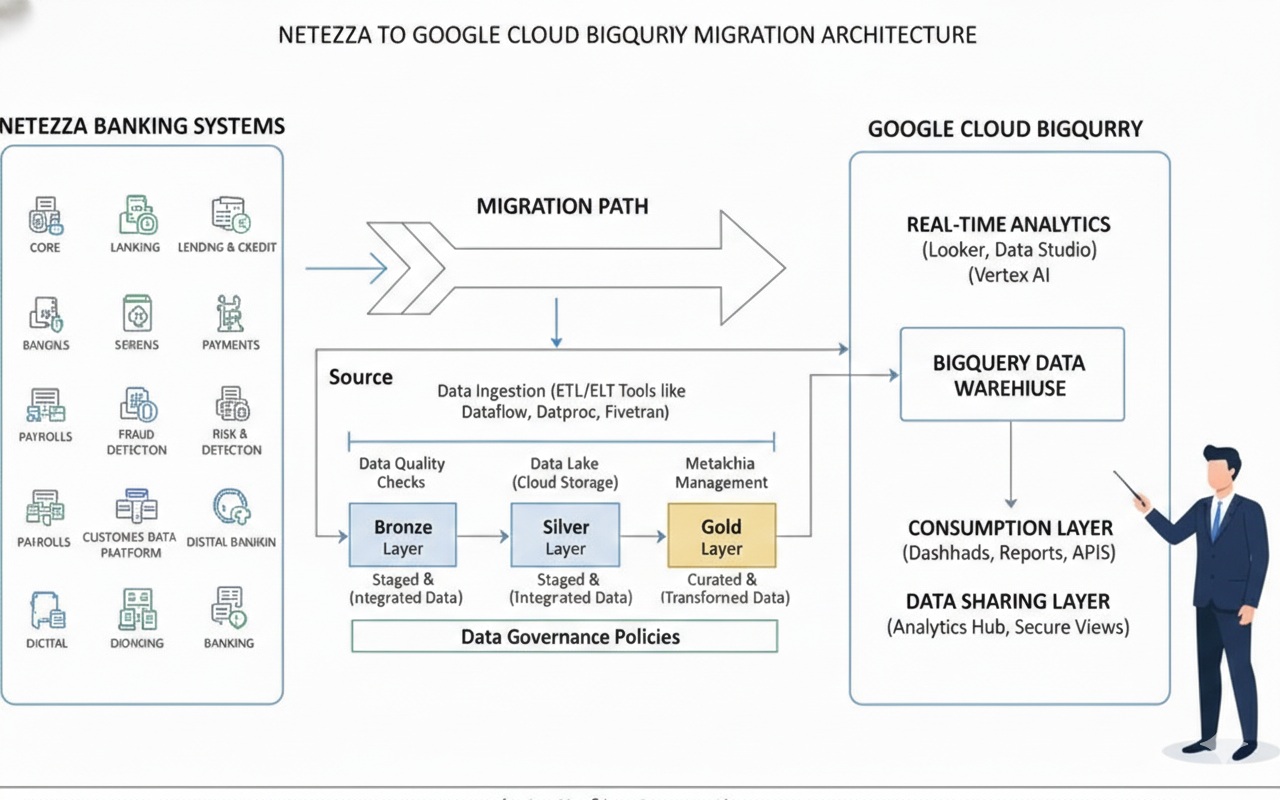
The Medallion Architecture on BigQuery (Bronze, Silver, Gold)
A popular and effective pattern is the "medallion" or layered data architecture, implemented as separate datasets or projects within BigQuery.
- Bronze Layer (Raw): This layer contains raw, untransformed data loaded directly from source systems. The structure mirrors the source as closely as possible. This provides a full, auditable history of all incoming data. Data is often retained here for a long period.
- Silver Layer (Refined): Data from the Bronze layer is cleaned, conformed, de-duplicated, and integrated. It's the "single source of truth." Here, you might join data from multiple sources, enforce data quality rules, and create integrated business entities (e.g., a conformed
customertable). - Gold Layer (Curated): This layer contains aggregated, business-centric data marts ready for analytics and reporting. These are often star schemas or denormalized tables optimized for specific use cases (e.g., a weekly sales summary for a BI dashboard). This layer provides analysts and business users with high-performance, easy-to-use data.
Domain-Driven Design and Data Mesh Concepts
For very large organizations, a centralized data platform can become a bottleneck. BigQuery supports decentralized architectural patterns like Data Mesh.
- Decentralized Ownership: Different business domains (e.g., Marketing, Sales, Supply Chain) own their data pipelines and Gold-layer data products within their own GCP projects.
- Data as a Product: Each domain is responsible for creating, maintaining, and documenting high-quality data products that they share with the rest of the organization.
- Self-Serve Platform: A central platform team provides the tools, standards, and infrastructure (like shared BigQuery reservations and governance policies) that enable domains to work autonomously.
- Federated Governance: A central governance body sets the global rules, but implementation and enforcement are federated to the domains.
BigQuery, combined with services like Dataplex for governance and IAM for access control, is an ideal foundation for implementing a data mesh.
9. Platform Advantages: Why BigQuery Outshines Traditional Architectures
Beyond the core architectural differences, BigQuery offers a host of features that simplify life for data teams.
- Time Travel: Instantly access any version of a table from any point in the last 7 days. This is a lifesaver for recovering from accidental data deletion or bad ETL runs, with no need for database backups.
- Schema Evolution: Easily add new columns to a table without rewriting the table or taking downtime. BigQuery handles schema updates gracefully.
- Reliability and Durability: Your data is automatically replicated across multiple data centers, providing 99.99% availability and extreme durability against disasters. This is managed by Google SREs.
- Observability: Rich integration with Google Cloud's operations suite (formerly Stackdriver) provides detailed logging, monitoring, and alerting on query performance, slot usage, and costs.
- Serverless Everything: The "no-ops" nature of BigQuery cannot be overstated. It frees up immense engineering capacity to focus on business logic.
10. Fortifying Your Data: Security, Governance, and Compliance in BigQuery
Moving sensitive enterprise data to the cloud requires a robust security and governance framework. Google Cloud provides a comprehensive, multi-layered approach.
Authentication and Authorization (IAM)
- Identity and Access Management (IAM): This is the foundation of GCP security. IAM controls who (users, groups, service accounts) can do what (roles/permissions) on which resource* (BigQuery datasets, tables, projects).
- Predefined Roles: BigQuery offers granular predefined roles like
BigQuery Data Viewer,BigQuery Data Editor, andBigQuery Job Userto easily grant appropriate permissions. - Custom Roles: For fine-grained control, you can create custom IAM roles with specific permissions.
Fine-Grained Access Controls
BigQuery allows you to go beyond table-level permissions.
- Column-Level Security: Grant users access to only specific columns in a table. This is critical for protecting PII (Personally Identifiable Information) and other sensitive data.
- Row-Level Security: Define policies that filter which rows a user can see based on their identity or group membership. For example, a sales manager can only see rows related to their region.
- Dynamic Data Masking: Automatically mask sensitive data in a column based on the user's role. For example, non-privileged users might see
***-**-1234for a social security number, while an HR admin sees the full number.
Data Governance with Dataplex
For enterprise-wide governance, Google Cloud Dataplex acts as an intelligent data fabric.
- Centralized Metadata Management: Dataplex automatically discovers, harvests, and catalogs metadata from BigQuery, GCS, and other sources.
- Data Lineage: Track how data flows and transforms across your pipelines, from source to final report. This is essential for impact analysis and debugging.
- Data Quality Checks: Define and schedule data quality rules to automatically validate your data and report on anomalies.
- Unified Governance: Apply consistent security and governance policies across all your data assets, regardless of where they are stored.
11. Mastering Efficiency: BigQuery Performance and Cost Optimization
One of the biggest shifts when moving to BigQuery is managing a consumption-based model. "Tuning" in BigQuery is less about the database engine and more about optimizing your queries and usage patterns to control costs.
Performance Tuning in BigQuery
- Partition and Cluster: As mentioned before, this is the most critical step. Always partition time-series tables by date. Cluster by columns that are frequently used in
WHEREclauses. - Use the Query Plan Explanation: Before running a costly query, examine its dry-run and execution plan. This will show you how much data will be processed and how the query is being executed. Look for stages that are reading far more data than necessary.
- Avoid
SELECT *: Only select the columns you actually need. This is a golden rule for columnar databases. - Use Materialized Views: For common and expensive aggregation queries (e.g., those that power a popular dashboard), create materialized views. BigQuery will automatically pre-calculate the results and keep them fresh, dramatically speeding up queries and reducing costs.
Strategic Cost Management
- Choose the Right Pricing Model:
- On-Demand: The default. You pay per terabyte of data scanned by your queries. Good for getting started or for unpredictable workloads.
- Flat-Rate (Editions): You purchase dedicated "slots" (units of compute capacity) for a fixed monthly or annual price. This provides predictable costs and is more economical for heavy, consistent workloads. Google Cloud offers Standard, Enterprise, and Enterprise Plus editions with different features and price points.
- Monitor Costs: Use the BigQuery cost analysis dashboards and set up custom alerts in Cloud Monitoring to be notified when costs exceed a certain threshold.
- Set Quotas: Apply user-level and project-level quotas to limit the amount of data that can be queried per day, preventing runaway queries from causing a budget shock.
- Use Table Expiration: Set default expiration times for staging tables and intermediate datasets to automatically clean up and avoid paying for storage of unnecessary data.
12. Ensuring a Smooth Transition: Testing, Validation, and Cutover Strategy
A successful migration culminates in a seamless cutover with zero business disruption. This requires a meticulous testing and validation plan.
The Three Pillars of Validation
- Data Validation: As detailed in section 5, this involves rigorous comparison of row counts, aggregates, and cell-level data between Netezza and BigQuery to ensure a perfect data match.
- ETL/Job Validation: Rerun your migrated ETL jobs and validate that they produce the same output and update the BigQuery tables correctly.
- Reporting and Functional Validation: Your business users and analysts must test their key reports and dashboards. Do they run correctly? Is the data accurate? Is the performance acceptable? This phase is critical for user acceptance.
The Parallel Run Phase
This is the final dress rehearsal before going live.
- For a critical period (e.g., one week or a full month-end close cycle), run the Netezza and BigQuery systems in parallel.
- Feed live production data into both systems.
- Run all ETL jobs and key reports on both platforms.
- Use automated tools to continuously compare the outputs. The goal is to prove that the new BigQuery system is a perfect functional replica of the old Netezza system. Any discrepancies must be investigated and resolved before the cutover.
The Final Cutover and Decommissioning
Once the parallel run is successful and all stakeholders have signed off, you can plan the final cutover.
- Schedule a Maintenance Window: Communicate clearly with all users.
- Perform a Final Sync: Run one last incremental data sync from Netezza to BigQuery.
- Freeze Netezza: Turn off all ETL jobs feeding into Netezza and make the database read-only.
- Redirect Applications: Re-point all BI tools, applications, and user connections from the Netezza connection string to the BigQuery connection string.
- Go-Live: Announce that the BigQuery system is now the official system of record.
- Monitor Closely: The hyper-care period begins. Closely monitor system performance, job success rates, and user feedback.
- Decommission Netezza: After a safe period (e.g., 30-90 days) where the BigQuery system has proven stable, you can safely power down and decommission the Netezza appliance, finally realizing the full cost savings of the migration.
13. Navigating the Maze: Common Challenges and Migration Pitfalls
Every large-scale migration has its challenges. Being aware of them is the first step to mitigation.
- Underestimating the "Long Tail": The 80/20 rule applies. 80% of the SQL and ETL logic might be easy to migrate, but the remaining 20% (complex stored procedures, undocumented business logic, obscure functions) can consume 80% of the effort.
- Scope Creep: Stakeholders may try to use the migration as an opportunity to add new features or change business logic. While tempting, this can delay the project. It's often better to migrate "like-for-like" first and then iterate.
- Lack of Skills: Your team, accustomed to managing a Netezza appliance, will need new skills in cloud infrastructure, IAM, BigQuery SQL, and cost management. Proactive training is essential.
- Performance Surprises: A query that was fast in Netezza might be slow or expensive in BigQuery if not properly optimized (e.g., if it lacks proper partitioning/clustering). Performance testing is crucial.
- Organizational Resistance: Change is hard. Some users may be comfortable with the old system and resistant to learning a new one. A strong change management and communication plan is key to winning hearts and minds.
14. Your Step-by-Step Netezza to BigQuery Migration Roadmap
Here is a high-level, phased roadmap for a typical enterprise migration project.
-
Phase 1: Assessment and Discovery (Weeks 1-4)
- Catalog all Netezza databases, schemas, tables, and views.
- Analyze query logs to identify usage patterns, complex queries, and key user groups.
- Inventory all upstream data sources and downstream applications (ETL, BI).
- Define success criteria, business objectives, and KPIs for the migration.
- Create a high-level business case and TCO analysis.
-
Phase 2: Planning and Design (Weeks 5-10)
- Select the migration strategy (e.g., Re-platform with selective Re-architecting).
- Design the target BigQuery architecture (datasets, partitioning/clustering strategy, IAM roles).
- Create a detailed project plan, including timelines, resources, and risk mitigation strategies.
- Select migration tooling (e.g., Google's Batch SQL Translator, a CDC tool, an accelerator like Travinto).
- Develop a detailed testing and validation plan.
-
Phase 3: Migration Execution (Months 3-9+)
- Set up the foundational GCP environment (projects, networking, IAM).
- Sprint 1: Schema and Data Migration. Migrate schemas and perform the initial bulk data load into BigQuery. Conduct initial data validation.
- Sprint 2-N: Workload Migration. In agile sprints, migrate ETL jobs, stored procedures, and BI reports, focusing on one subject area or application at a time. Each sprint should include development, testing, and validation.
- Sprint N+1: Parallel Run. Execute the parallel run phase.
- Sprint N+2: Cutover. Perform the final production cutover.
-
Phase 4: Optimization and Modernization (Ongoing)
- Decommission the Netezza appliance.
- Continuously monitor and optimize BigQuery costs and performance.
- Begin new projects that leverage cloud-native capabilities (e.g., building a real-time analytics dashboard or a BigQuery ML model).
- Continue to train and enable the team on advanced BigQuery and GCP features.
15. A Real-World Scenario: Enterprise Retailer's Netezza Modernization Journey
Company: "GlobalMart," a large retail chain.
Netezza Pain Points:
* Their Netezza Mako appliance was nearing end-of-support.
* Nightly batch jobs to process sales data were taking over 10 hours, frequently missing the deadline for morning business reports.
* They couldn't analyze clickstream and customer sentiment data alongside their sales data.
* The data science team had to extract massive, stale datasets to their local machines to build models, a slow and insecure process.
Migration Approach:
GlobalMart chose a phased, Re-platform strategy.
- Phase 1 (Foundational): They used
nz_unloadand GCS Transfer Service to perform a bulk load of all historical sales, inventory, and supply chain data into BigQuery. They redesigned the schemas to use date partitioning and clustering onstore_idandproduct_id. - Phase 2 (Coexistence): They kept Netezza running for legacy reports. Using a CDC tool, they streamed all new transactions from their source databases to both Netezza and BigQuery in parallel. This ensured data consistency.
- Phase 3 (Modernization): They re-architected their most critical workload—the nightly sales processing job. They replaced a complex 5000-line Netezza stored procedure with a series of scalable Dataflow jobs and BigQuery
MERGEstatements. - Phase 4 (Cutover): After a successful one-month parallel run, they redirected their primary BI tool (Looker) to BigQuery and decommissioned Netezza.
Business and Technical Outcomes:
* Cost Reduction: TCO was reduced by over 40% in the first year by eliminating hardware maintenance, licensing, and data center costs.
* Performance Boost: The nightly sales processing job now runs in under 45 minutes, a 90% improvement.
* New Insights: They can now join their terabytes of web clickstream data (stored in GCS and queried via BigQuery federated queries) with their sales data to perform basket analysis and customer journey optimization.
* AI-Powered Forecasting: Their data science team now uses BigQuery ML to build demand forecasting models directly on real-time inventory and sales data, improving forecast accuracy by 15%.
16. Accelerating Your Journey: Helpful Migration Tools and Services
You don't have to embark on this journey alone. A rich ecosystem of tools can de-risk and accelerate your migration.
Google's Native Migration Tooling
- BigQuery Migration Service: An end-to-end service that helps plan and execute migrations. It includes:
- Assessment: Analyzes Netezza logs and metadata to provide insights into complexity and plan the migration.
- Batch SQL Translator: Automatically converts Netezza SQL, UDFs, and scripts to BigQuery's standard SQL dialect.
- Data Validation: Tools to help automate data validation checks.
- BigQuery Data Transfer Service: Managed service to automate data loading from GCS and other sources into BigQuery.
- Storage Transfer Service: For high-speed, managed data transfer from on-premises to GCS.
Third-Party Acceleration Tools: A Spotlight on Travinto Tools
While Google's tools provide a strong foundation, specialized third-party tools can offer an even higher degree of automation and end-to-end project management. Travinto Tools is a prime example of a solution designed to accelerate complex warehouse migrations.
How Travinto Accelerates Netezza to BigQuery Migration:
- Comprehensive Assessment: Travinto goes deep into Netezza system tables and query logs to create a complete inventory of all code objects (SQL, scripts, procedures), their interdependencies, and their execution lineage. This automated discovery phase eliminates weeks of manual analysis.
- Intelligent Code Conversion: It provides highly automated, context-aware conversion of Netezza SQL, BTEQ scripts, and NZPL/SQL procedures to BigQuery-native equivalents (Standard SQL, BigQuery Scripting). It intelligently handles complex patterns that generic translators often miss.
- Automated Validation: The tool can automatically generate and execute validation queries against both the source and target systems, comparing row counts and checksums across thousands of tables to ensure data integrity without tedious manual scripting.
- End-to-End Orchestration: It helps manage the entire migration lifecycle, from analysis and conversion to testing and final cutover, providing a unified dashboard for tracking progress and managing dependencies.
By automating the most repetitive, time-consuming, and error-prone tasks, solutions like Travinto can significantly reduce migration risk, lower project costs, and shorten the delivery time from years to months.
17. The Human Element: Skills, Teams, and Operating Model Transformation
Technology is only half the battle. A successful migration requires a transformation in your team's skills and your data operating model.
- From DBA to Data Engineer: The role of the traditional Netezza Database Administrator (DBA), focused on hardware, tuning, and backups, evolves into a Cloud Data Engineer. The new focus is on software development principles, infrastructure-as-code (Terraform), CI/CD for data pipelines, and performance/cost optimization.
- New Skills Required:
- Cloud Fundamentals: IAM, networking, storage concepts in GCP.
- BigQuery Expertise: Standard SQL, partitioning, clustering, cost management, scripting.
- Data Processing: Skills in tools like Dataflow, Spark (on Dataproc), and dbt.
- Orchestration: Experience with Airflow (Cloud Composer).
- DevOps/DataOps: CI/CD, infrastructure-as-code.
- Training and Enablement: Invest heavily in training. Certifications like Google's Professional Data Engineer are a great goal. Encourage hands-on learning through pilot projects.
- New Operating Model: Shift from a centralized, ticket-based system to a more agile, product-oriented model. Data teams should be embedded with business units, working iteratively to deliver value.
18. A Moment of Pause: When Migration May Not Be the Right Choice
While the benefits are compelling, migration isn't always the right immediate answer for every workload.
- Application is Being Sunset: If a legacy application that relies on Netezza is scheduled to be decommissioned in the near future, the cost and effort of migration may not be justifiable.
- Extremely Low Usage/Static Data: A small, static data mart that is queried infrequently and has no new data flowing in might be cheaper to maintain on-premises until it's no longer needed.
- Lack of Organizational Buy-in: If there is no executive sponsorship or willingness to invest in cloud skills and change management, a large-scale migration is likely to fail. A smaller proof-of-concept might be a better starting point to demonstrate value and build support.
19. The Horizon Ahead: The Future of Analytics on BigQuery
Migrating to BigQuery isn't the end of the journey; it's the beginning. It positions your organization to take advantage of the rapid innovation in the data and AI space.
- Democratized AI: With BigQuery ML and integration with Vertex AI, more of your team can build and deploy machine learning models, moving from descriptive ("what happened?") to predictive and prescriptive ("what will happen, and what should we do?") analytics.
- The Rise of Real-Time: As more businesses operate in real-time, the ability to ingest and analyze streaming data will become a key competitive advantage. BigQuery is built for this.
- Unstructured Data Analysis: With BigQuery's ability to query data in GCS (via BigLake) and its new capabilities for analyzing unstructured data (like documents and images), you can start to unlock insights from all of your data, not just the structured portion.
- Serverless Spark: Google Cloud's serverless Spark offerings allow you to run your existing Spark jobs without managing clusters, integrating seamlessly with your data in BigQuery.
20. Frequently Asked Questions (FAQ) about Netezza to BigQuery Migration
Q1: How long does a Netezza to BigQuery migration typically take?
A: This varies greatly with complexity, but a typical enterprise migration can take anywhere from 6 to 18 months. Using accelerator tools can often shorten this timeline significantly.
Q2: Is BigQuery always cheaper than Netezza?
A: In terms of Total Cost of Ownership (TCO), BigQuery is almost always significantly cheaper. It eliminates hardware costs, reduces administrative overhead, and moves you to a pay-for-use model. However, poorly written queries in an on-demand pricing model can lead to unexpected costs, making cost management crucial.
Q3: What is the biggest challenge in a Netezza to BigQuery migration?
A: The most significant challenge is typically the conversion of complex, non-standard SQL and stored procedures (NZPL/SQL). This business logic, built up over years, requires careful analysis, translation, and testing.
Q4: Can I keep my existing ETL and BI tools?
A: Yes, most modern ETL (Informatica, DataStage) and BI (Tableau, Power BI, Cognos) tools have native, high-performance connectors for BigQuery. You will need to re-point them and likely update the data models and reports to use BigQuery's SQL dialect.
Q5: What happens to my Netezza stored procedures?
A: They must be refactored. Simple procedural logic can be migrated to BigQuery Stored Procedures. More complex logic is often best re-architected into scalable, cloud-native services like Cloud Dataflow jobs or Cloud Functions.
21. Conclusion: Your Journey to a Modern Data Future
The migration from Netezza to BigQuery is more than a technical upgrade—it's a strategic business transformation. It's about shedding the constraints of a rigid, on-premises past and embracing a future of limitless scale, unparalleled agility, and deep intelligence.
By moving from a tightly coupled appliance to a disaggregated, serverless architecture, you unlock significant cost savings, supercharge performance, and empower your teams to focus on innovation instead of infrastructure management. This journey allows you to build a modern data platform that not only serves today's analytics needs but is also ready for the AI-driven, real-time challenges of tomorrow.
The path is complex, requiring careful planning, the right strategy, and a commitment to transforming skills and processes. But with a clear roadmap, powerful tools, and a focus on delivering incremental value, the destination is well worth the journey.
Call to Action
Your Netezza to BigQuery migration journey begins with a single step: a comprehensive assessment. Start by understanding the full scope of your current environment—your data, your workloads, and your dependencies. Use this analysis to build a compelling business case and a detailed plan that will guide your organization toward a more powerful, flexible, and intelligent data future on Google Cloud.